
PROBLEM
How might we prevent chronic pain and prescription opioid addiction with a scalable patient self-management program that is provider focused?
DISCOVERY
User Persona
In order to gain deeper insights into the experiences of individuals enduring chronic pain, we conducted interviews with both patients grappling with conditions and physicians responsible for their treatment. By engaging with both perspectives, we sought to develop a comprehensive understanding of the challenges and realities faced by those living with chronic pain.

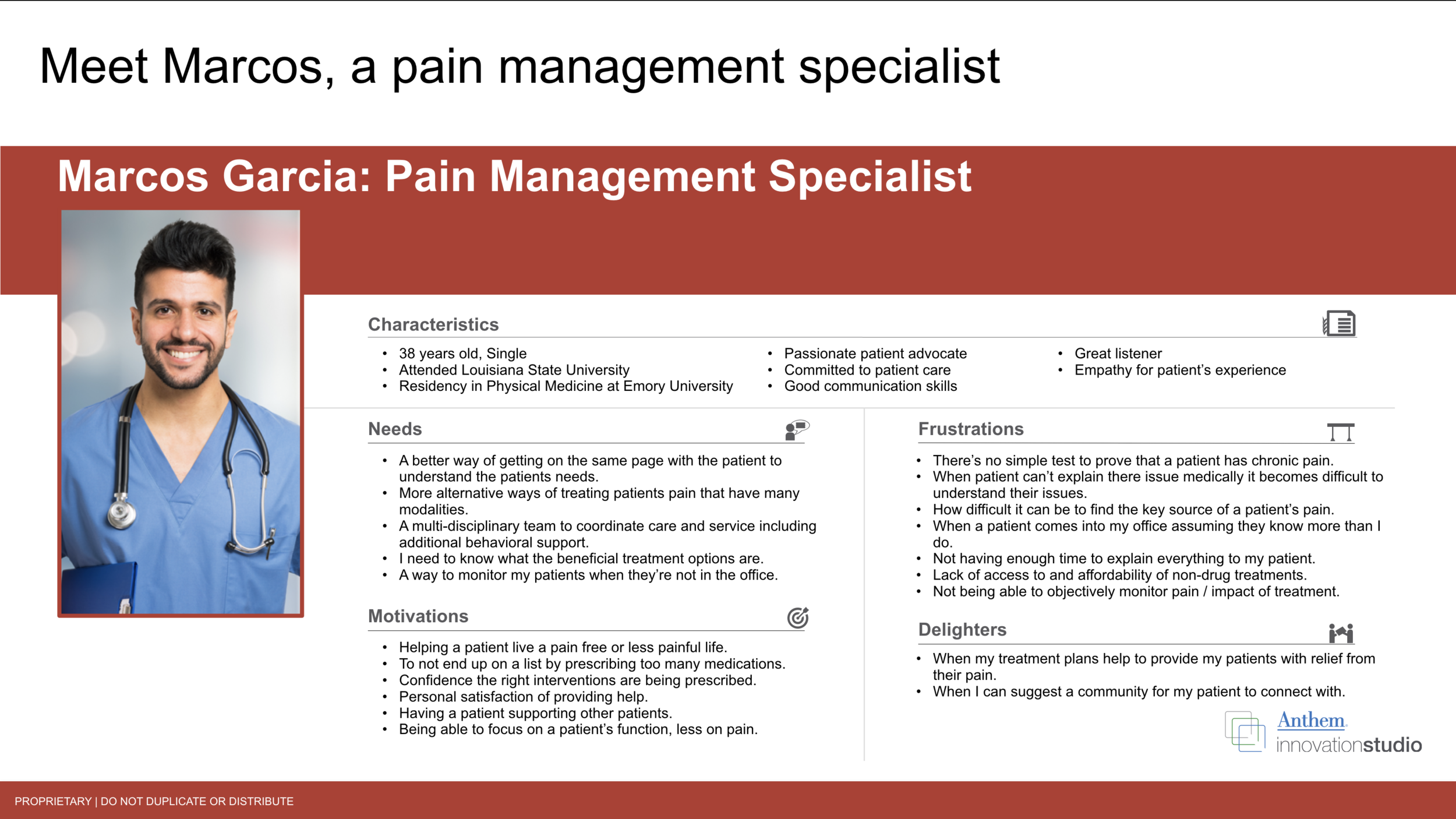
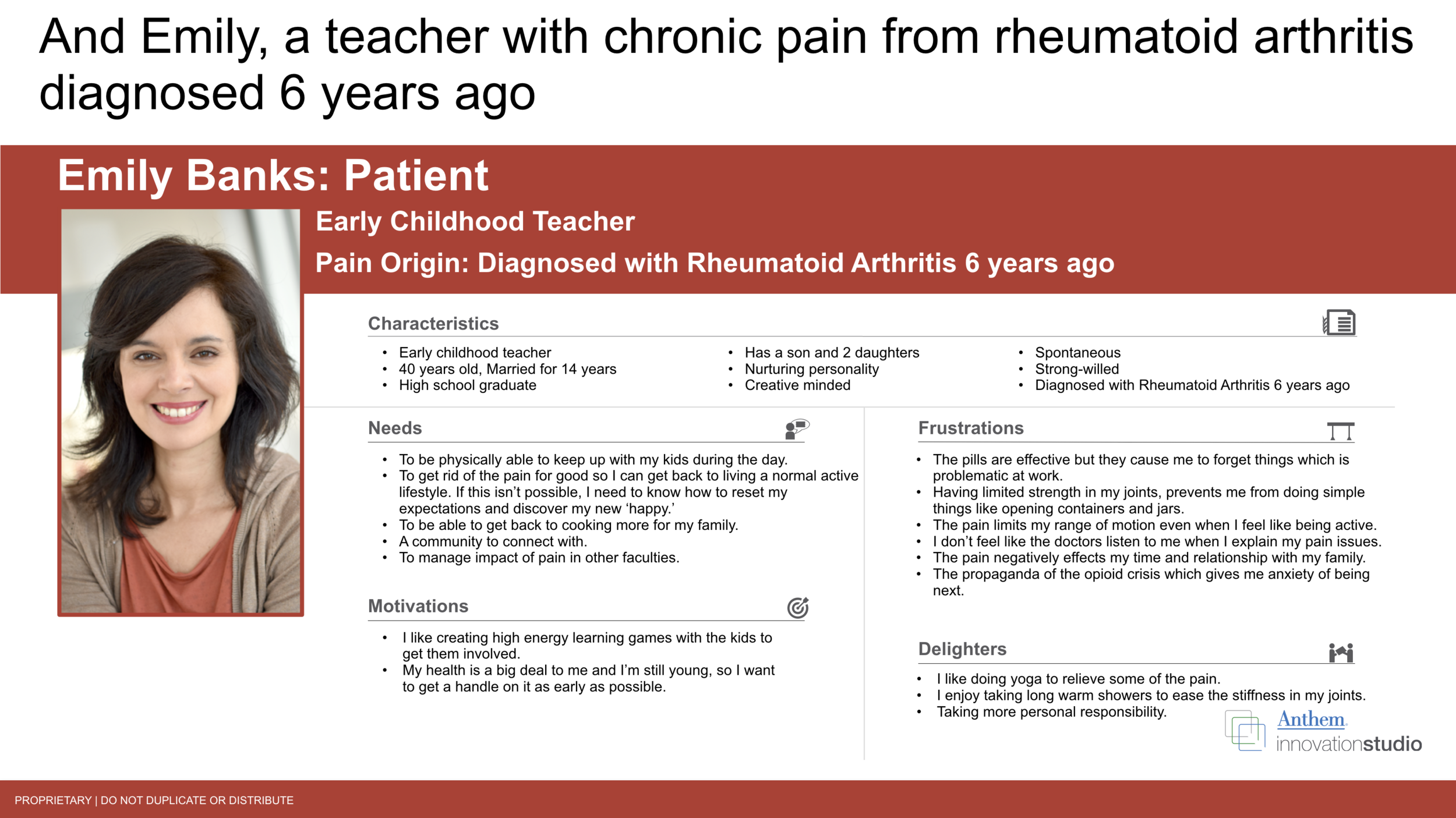
Design Thinking Workshop
We organized a comprehensive workshop involving 20 participants, during which we went the extra mile to gather essential insights. This included conducting in-depth interviews with three patients and three doctors, enabling the participants to deeply grasp the issues we aimed to address. By closely observing and engaging with these individuals, we successfully identified their pain points, desires, and requirements, which served as valuable validation for the personas we had developed earlier. In particular, the doctors and patients generously shared their experiences, taking us through a typical day in their lives, providing us with a profound understanding of the challenges they encounter regularly.
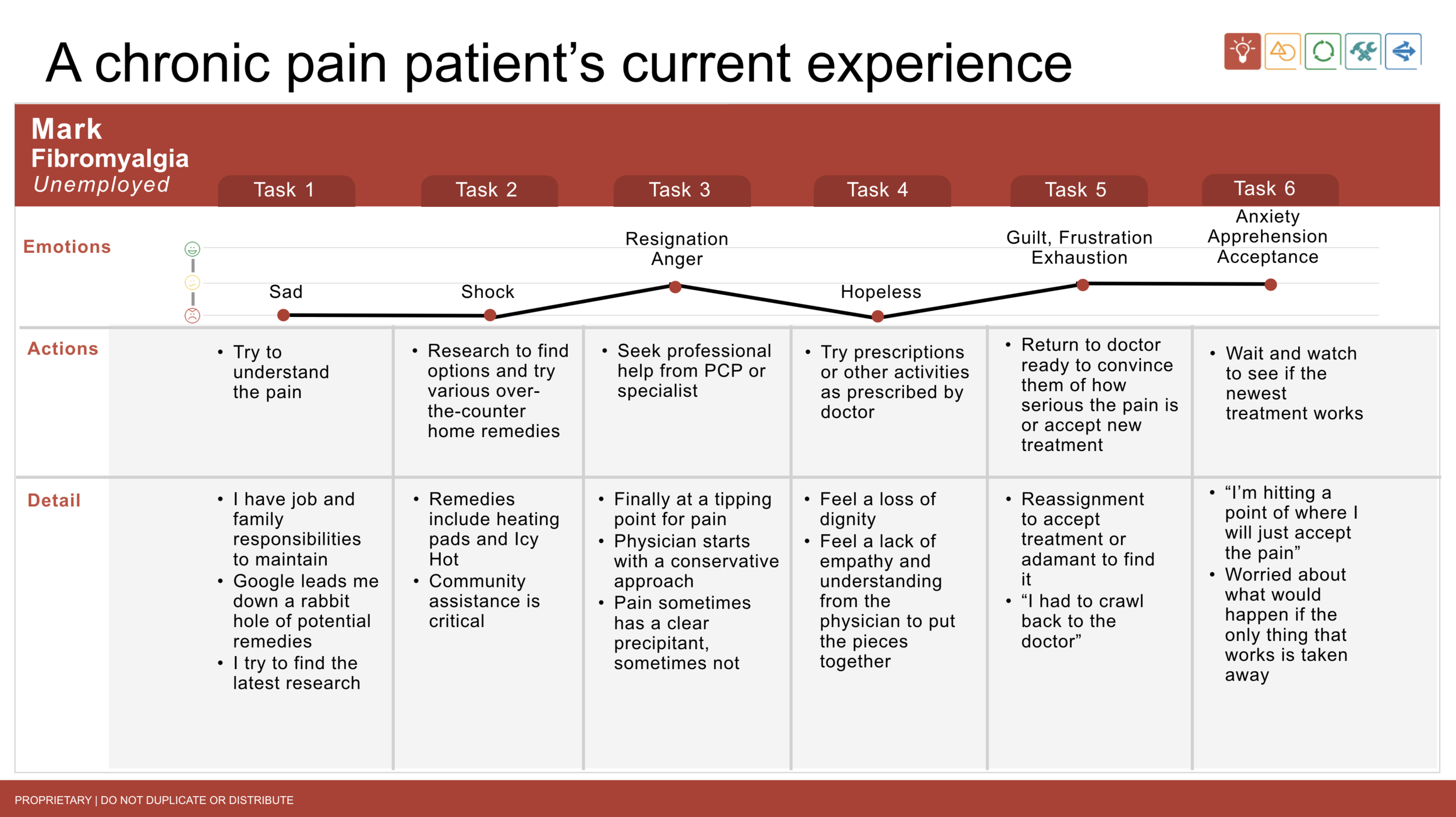
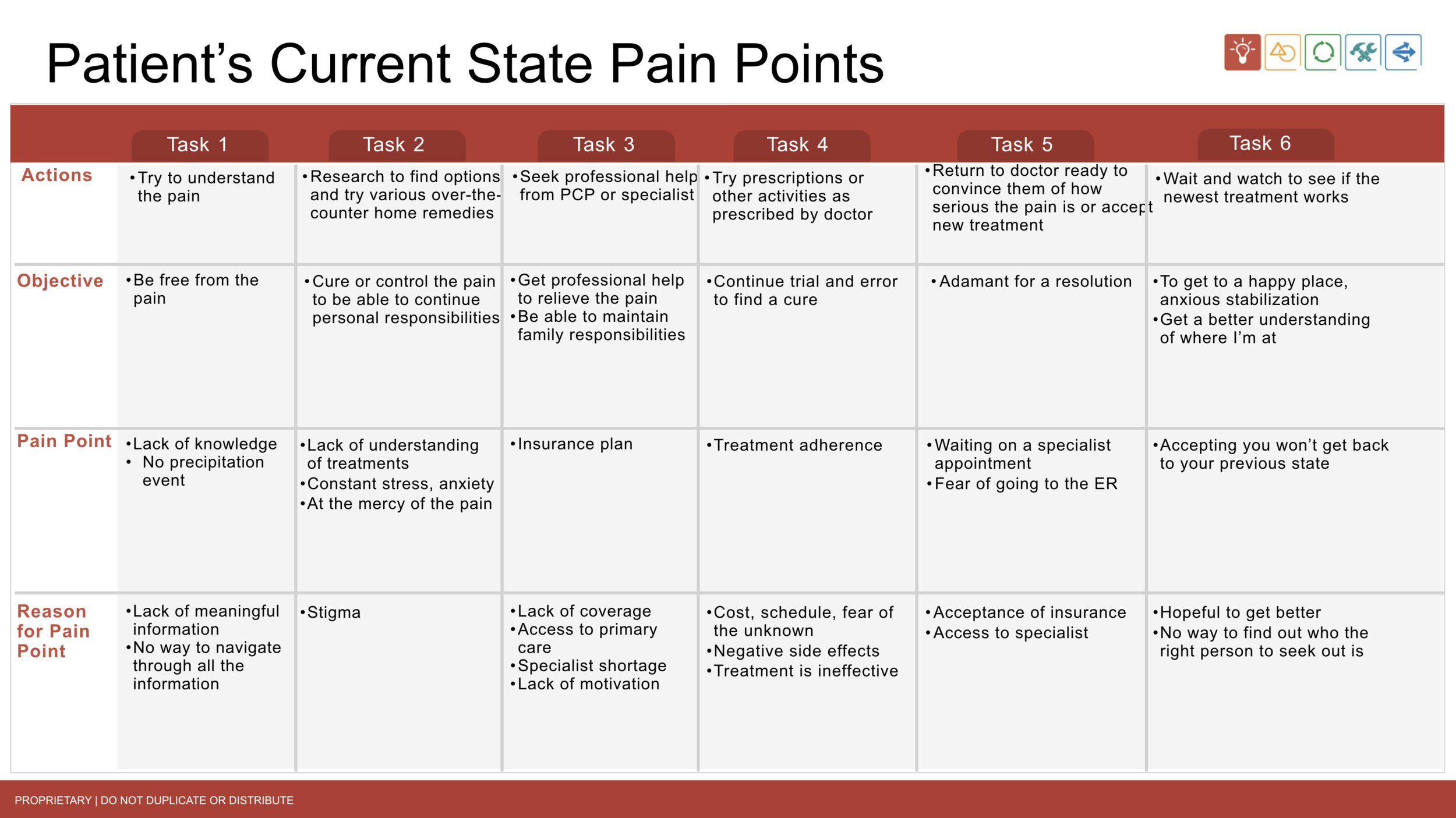
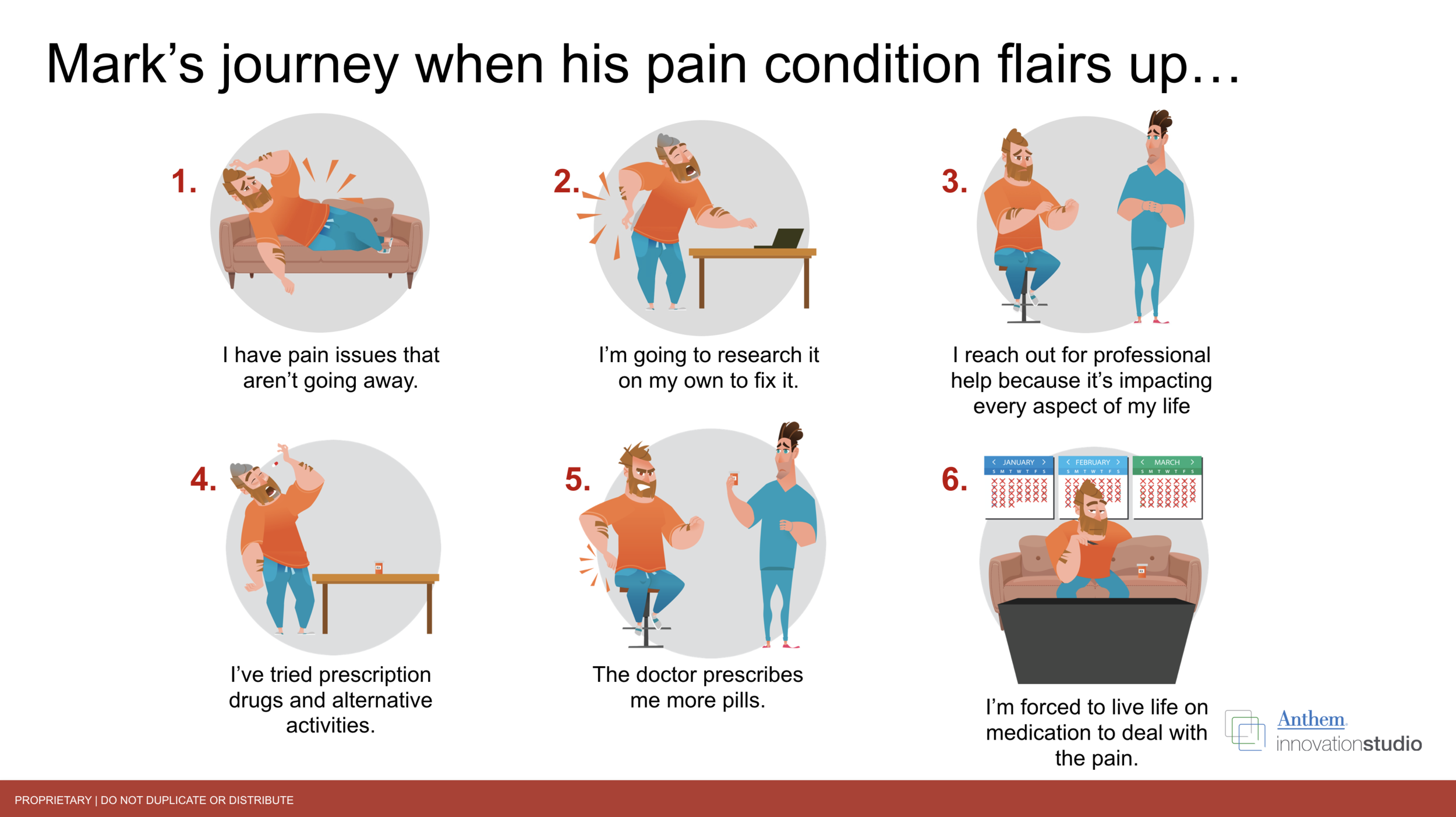
Journey Map: Current State
After interviewing, we gathered pain points, and insights to generate the patients current experience with visiting the doctor.
SOLUTION
The solution supports people living with pain and their healthcare providers by delivering a physician-directed, comprehensive pain-care plan. It eases distress, anxiety, frustration, and uncertainty by giving patients clear guidance, meaningful resources, interactive progress tracking, and reliable support. Incentives encourage both patients and providers to complete key tasks and follow the agreed care plan, while feedback helps providers monitor progress and adjust treatment when needed. The result is greater empowerment and self-efficacy for patients, reduced pain, increased hope, and improved quality of life.
This approach also aligns with value-based care, which rewards providers for preventing unnecessary surgery and improving outcomes through conservative treatment options. By capturing clear progress and treatment metrics, the solution can demonstrate that a provider’s methods are preventive and effective, supporting the value-based reimbursement earned for their care.
From here we created a rough flow of how the patient would interact with the app from receiving the initial email from the doctor, meeting their care team, and checking their pain level progressions.
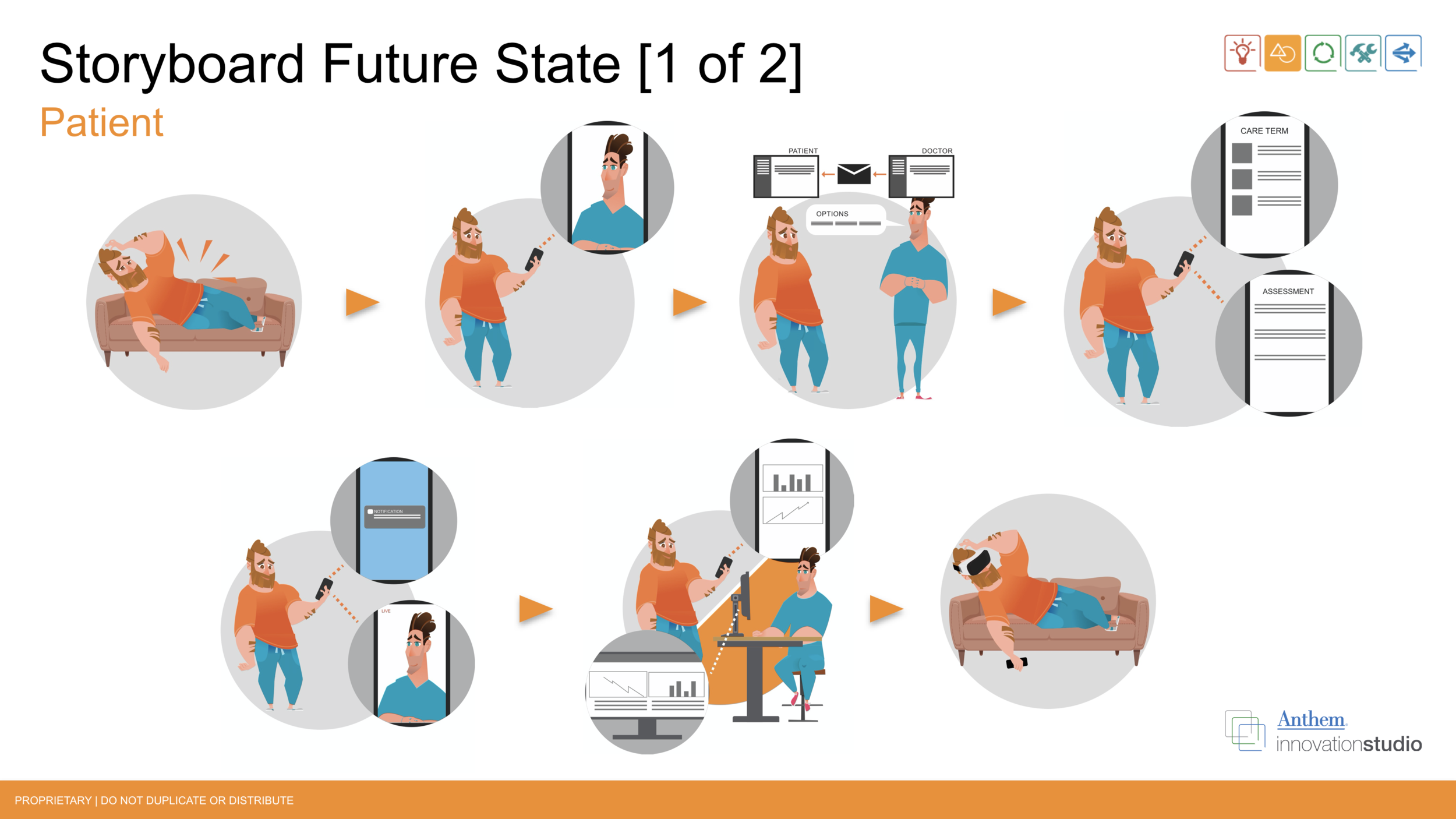
Journey Map: Future State
The future relationship between the chronic pain patient and doctor looks a lot more transparent than it does now. The patient is more informed on how to be pain-free and the doctor is more informed on what the patient is going through on the daily.

ANIMATED JOURNEY MAP: CURRENT & FUTURE STATE
To further drive the point home, I took the Future State Journey Map and created an animated video out of it using Adobe Illustrator and After Effects.
IDEATION: PATIENT PAIN MANAGEMENT MOBILE APP
Wireframes
A couple of dashboard design iterations that led to the main design.
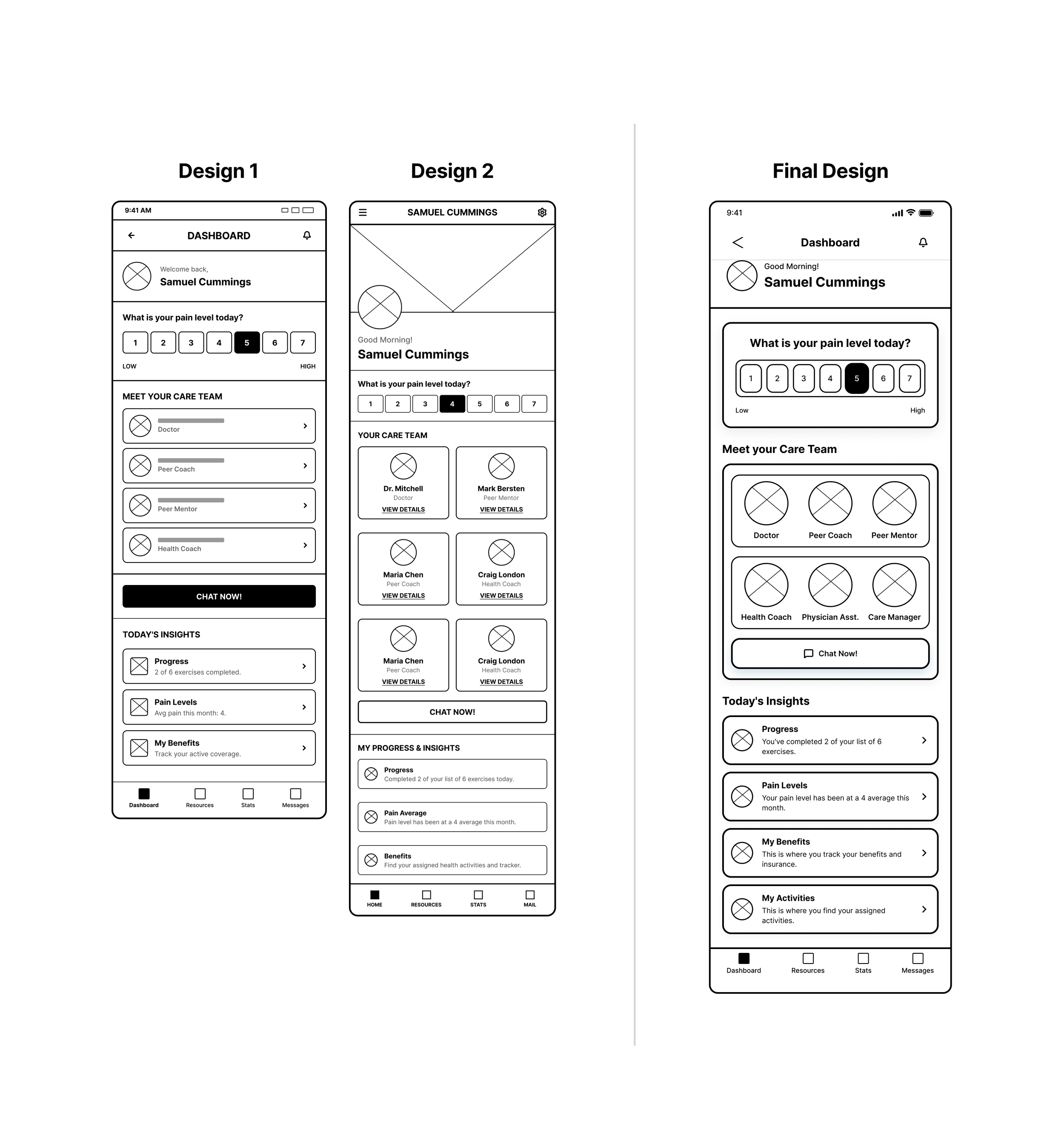
Design 1: While the layout successfully establishes a logical top-to-bottom information hierarchy with all core content blocks, including a greeting, pain scale, care team, chat CTA, and insights, it ultimately feels cramped and list-heavy. Key elements lack visual distinction, making the care team hard to scan and the pain scale easy to miss, while the "Chat Now" button and insights section compete for attention or feel tacked on.
Design 2: Although the updated layout improves scannability by using cards for the care team and giving the pain scale more visual weight, it introduces new density issues. The heavy grid of care team cards dominates the screen, burying the chat CTA and pushing insights too far down, while a redundant header and competing sections disrupt the overall visual rhythm.
Final Design: This design achieves a clear visual hierarchy by placing the greeting and a prominent pain scale at the top, followed by a compact icon row for the care team that remains visible without dominating the screen. The chat CTA is intuitively placed, insights are neatly organized into scannable cards, and the addition of a bottom navigation bar combined with generous spacing creates a calm, approachable healthcare experience.
DESIGN & VALIDATION
Onboarding Pain Assessment User Flow
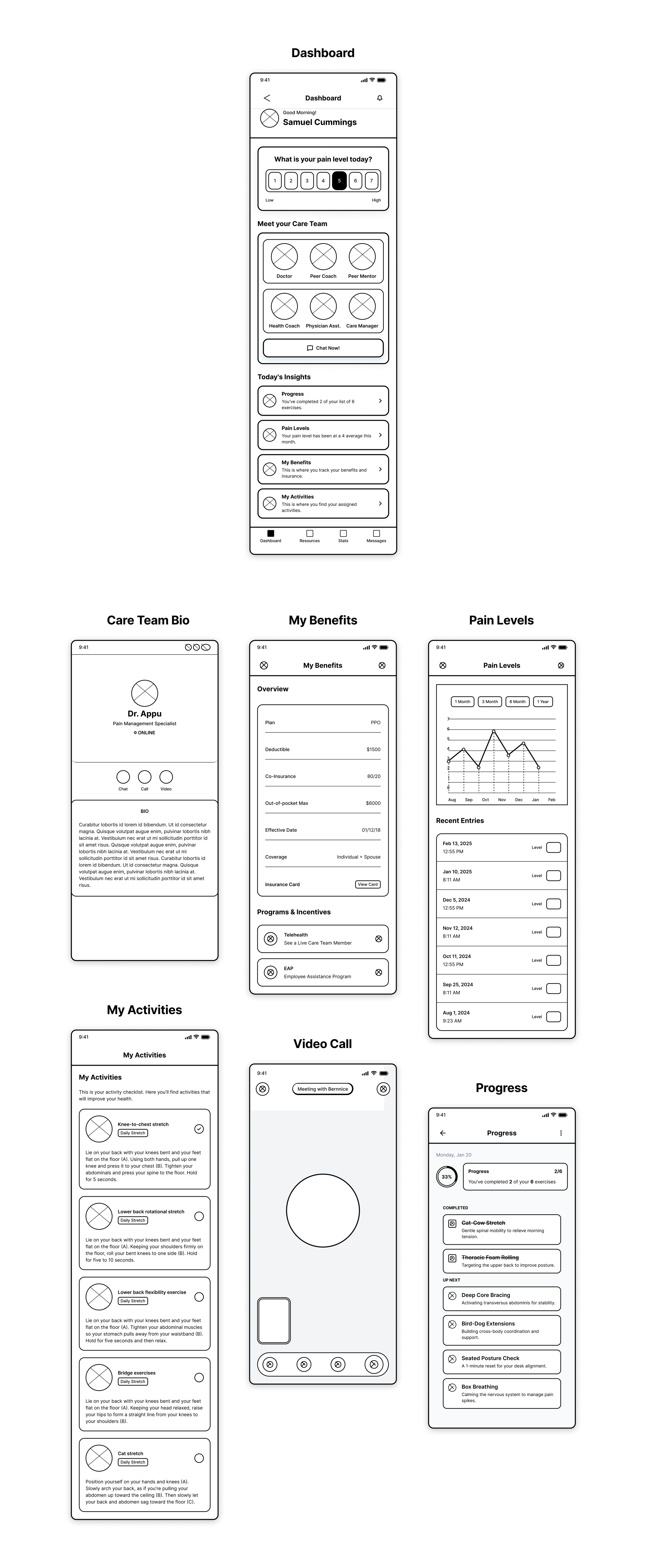
Upon logging into the app, patients are first guided through a pain assessment that helps identify the location, intensity, and nature of their discomfort. This initial evaluation provides both the care team and the application with a clear understanding of the patient’s current condition. Once completed, the app establishes a personalized baseline that informs treatment recommendations, progress tracking, and ongoing support.
After completing the pain assessment, patients are introduced to their dedicated care team who will support them throughout their entire journey. This team becomes their direct point of contact, providing guidance, encouragement, and personalized care whenever it’s needed. Patients also gain access to a centralized dashboard that offers a clear, bird’s-eye view of their pain levels, treatment progress, and milestones. This ensures transparency, builds confidence, and empowers patients to stay informed and actively engaged in their healing process.
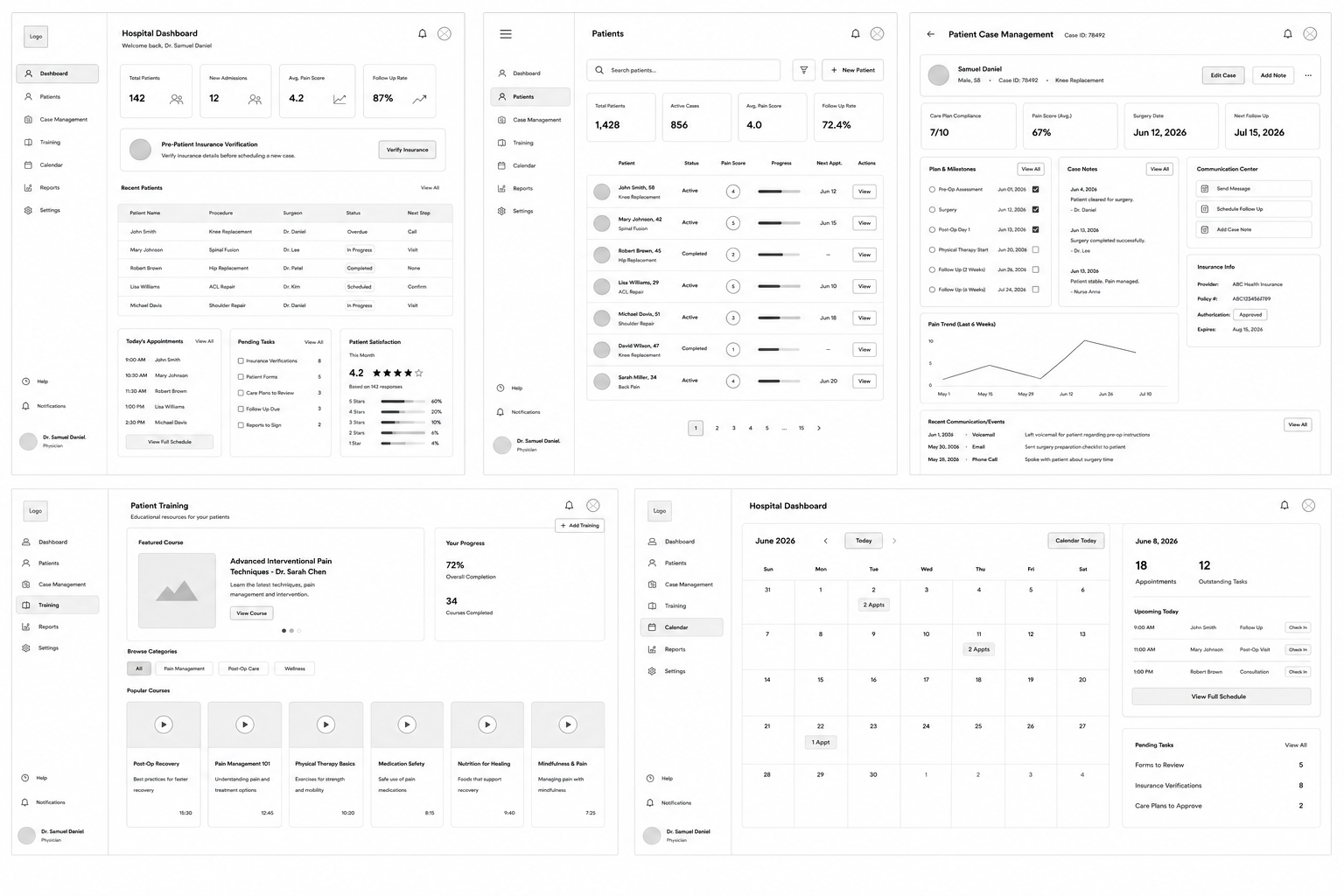
The Provider Dashboard offers a complete, at-a-glance view of patient care and progress. The Overview Dashboard highlights real-time pain levels and overall patient status, while the Patient Dashboard allows providers to drill into individual patient details, history, and trends. The Analytics Dashboard delivers deeper insights into outcomes, patterns, and performance. The Messaging Dashboard centralizes all patient communication for faster, more personal care, and the Calendar keeps appointments, follow-ups, and care milestones organized in one place. Together, these tools create a streamlined, data-driven workflow that helps providers deliver proactive and personalized treatment.
Patient Mobile App Screens
IDEATION: PROVIDER PAIN MANAGEMENT DESKTOP APPLICATION
Wireframes
DESIGN & VALIDATION
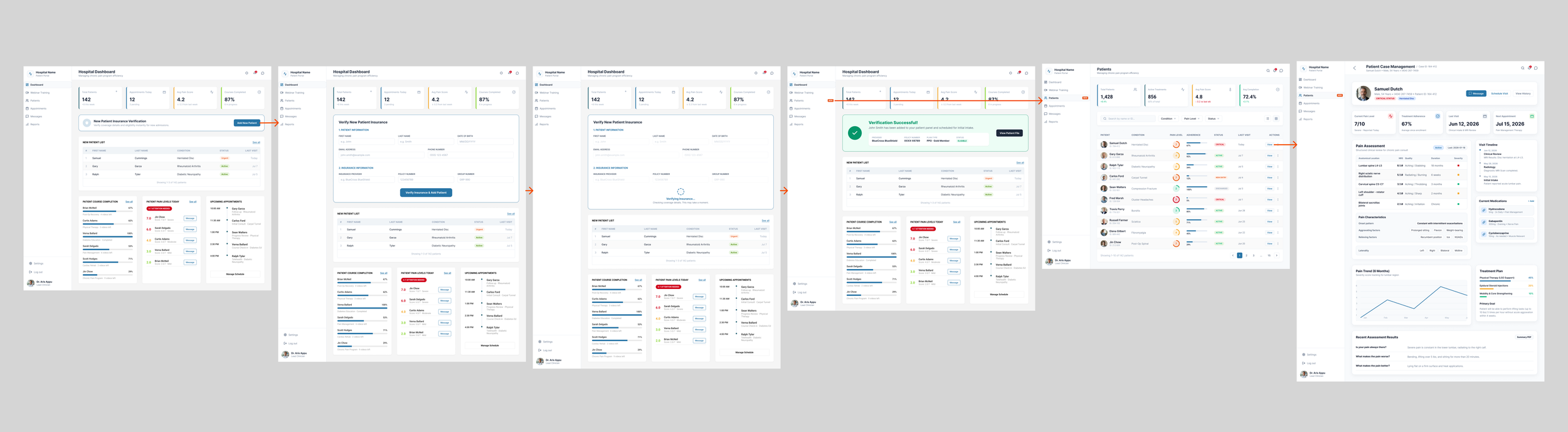
New Customer Enrollment Flow/Insurance Verification
The Insurance Verification page allows providers to quickly run and confirm a patient’s insurance coverage before the patient is added to the system. This ensures eligibility, benefits, and authorization requirements are validated upfront, reducing administrative delays and preventing billing issues later. Once verified, the patient is seamlessly imported into the platform, allowing care to begin with confidence and accuracy.
Provider Desktop Application

RESULTS
User Feedback Summary:
Overall, users found the interface intuitive and easy to navigate.
The chat feature was praised for its responsiveness and simplicity, making it convenient for users to communicate with their care providers.
Video consultations were reported to be smooth and seamless, with minimal lag or technical issues.
Users appreciated the ability to schedule appointments and receive reminders through the app, streamlining the healthcare management process.
Some users suggested additional features such as medication tracking and integration with wearable devices for comprehensive health monitoring.
Ease of Use Ratings:
Chat Feature: 4.5/5
Video Consultations: 4.7/5
Appointment Scheduling: 4.3/5
User Satisfaction:
90% of users expressed satisfaction with the app's functionality and ease of use.
85% of users reported that they would recommend the app to friends or family members.
Specific User Comments:
"I love how easy it is to chat with my doctor whenever I have a question or concern. It saves me the hassle of scheduling an in-person appointment."
"The video consultations feel just like being in the doctor's office. It's so convenient, especially for routine check-ups."
"I appreciate the reminders for my upcoming appointments. It helps me stay on top of my healthcare routine."
Areas for Improvement:
A few users expressed a desire for more personalized features, such as the ability to customize notification preferences or access tailored health resources within the app.
While the app performed well overall, to make adoption of the features easier on the customer, most of the video and chat functions were later integrated into the current Telehealth app that doctors and patients currently use and are more familiar with.
Pain Management Reimagined AI Experience
If this project were built today, Artificial Intelligence would serve as the core engine of the experience. Rather than functioning only as a tracking tool, the platform would become an intelligent, adaptive care companion that learns from each patient’s behavior, anticipates their needs, and supports providers with actionable insights.
The pain scale remains central to the experience, but AI transforms it from a manual input into a guided interaction. Instead of simply asking patients to log their pain, the system proactively suggests a likely pain level based on historical patterns, sleep, activity, and emotional trends. The user confirms or adjusts with a single tap, turning data entry into validation rather than work.
This approach preserves clinical accuracy while reducing friction and improving long-term engagement.
For patients, AI introduces:
Personalized pain pattern recognition and prediction
A conversational health assistant that translates emotions and symptoms into structured medical data
Adaptive care plans that evolve based on real-world behavior
Smarter reminders and encouragement that prevent burnout
Early warning detection for flare-ups, emotional distress, or risky medication patterns
The experience shifts from “tracking pain” to “being supported through pain.”
AI Predictive Pain Level Flow
AI Predictive Pain Level uses patient data, ongoing assessments, and behavior patterns to intelligently anticipate changes in pain before they happen. By analyzing trends over time, the AI can identify early signals of flare-ups or improvement and adjust recommendations accordingly. This proactive approach allows patients and their care team to stay ahead of pain, make informed decisions sooner, and create a more responsive, personalized treatment experience.
Original Experience: Pain is logged → Data is stored → Doctor reviews later
AI-Enhanced Experience: Patterns are learned → Pain is predicted → User confirms → AI interprets → Doctor acts immediately
Chatbot
The AI chatbot transforms the pain management app from a passive tracking tool into an active care companion. In the previous version, patients logged pain manually and waited for providers to review the data later. With the AI chatbot, support becomes immediate, personalized, and continuous. The chatbot guides patients through pain check-ins using conversational prompts, helping them describe symptoms more accurately while reducing the effort of data entry. It recognizes patterns in pain levels, mood, activity, and treatment response, allowing it to anticipate needs, suggest next steps, and flag concerns in real time.
Instead of patients simply recording pain, they feel supported through it. The chatbot offers reassurance, education, and timely reminders while translating everyday language into structured clinical data providers can act on quickly. For doctors, this means clearer insights, faster decision-making, and early detection of risks. For patients, it means less friction, more engagement, and a sense that the system understands and responds to their experience rather than just storing it.
AI Chatbot Error States
Well-designed error states help maintain trust, reduce frustration, and guide users when the AI cannot complete a request.
Connection Error
Use when: The user loses internet connectivity.
Purpose: Explains the connection issue and allows the user to retry without assuming the app is broken.
Server Error
Use when: The AI service or backend is unavailable.
Purpose: Lets users know the problem is on the system's side and encourages them to try again later.
Timeout Error
Use when: The AI takes too long to respond.
Purpose: Prevents indefinite waiting by explaining the delay and providing a retry option.
Invalid Input
Use when: The AI cannot understand the user's message.
Purpose: Prompts users to clarify or rephrase their request, reducing inaccurate responses.
Privacy Protection
Use when: Sensitive personal information is detected.
Purpose: Prevents processing protected data while guiding users to submit safe, appropriate information.
For providers and organizations, AI enables:
Automatic patient risk stratification and prioritization
Clear daily summaries instead of raw data overload
Faster clinical decision-making with higher confidence
Predictive intervention opportunities that reduce emergency visits and long-term treatment costs
Rich, research-ready datasets that support population health initiatives
This redesign reframes the platform as an intelligent care system rather than a static health application.